SAP is translation of the German term Systeme, Anwerndungen und Produkte in der Datenverarbeitung. It was developed y SAP AG, Germany. The basic idea behind developing SAP was the need of standard application software that helps in real-time business processing . The development process began in 1972 with five IBM employees, Dietmar Hopp, Hans-werner, hasso Plattner, Klaus Tschira, and Claus Wellenreuther in Mannheim, Germany. A year later, the first financial and accounting software was developed; it formed the basic for continuous development of other software components, which later came to be known as the SAP R/1 System. Here, R stands for the real-time data processing and 1 indicates single-tier architecture, Which means that the three networking layer networking layer, Presentation, Application, and database, on which the architecture of SAP depends, are implemented on a single system.
Wednesday, January 13, 2016
Saturday, December 26, 2015
SAP R3 Tier Architecture and its history
The
third generation set of highly-integrated software modules that perform common
business function based on multi-national leading practices. Takes care of any
enterprise however it may be in operations, spread over the world
geographically.
Click the link below to learn more.
SAP R3 TIER
Click the link below to learn more.
SAP R3 TIER
R/3
Supports the Business
nComplete business solution across all
business functions
nHas solutions to most critical business
processes (over 1000)
nProvides an enterprise wide solution
nSupport global business and accounting
processes
nStandardized business processes using
best practice models
nSupports multiple business structures and
multiple business units
Implication
for R/3 Implementation
nRequires process view
nRequires answers to questions of work
flow at least
nPositions the firm to undertake BPR (business process re-engineering) or major
modification to R/3
SAP
R/3 - Summary
nIs a comprehensive suite of integrated
applications meeting the needs of most enterprises in the common business
processes.
nCovers
nFinancial management
nLogistics
nHuman resource management
nSupports
nBest practice through work flow analysis
What
Is 3-tiered?
3 functional areas
Presentation
Workstations
Application logic
Small boxes
Data management

Large box
How to install SAP IDES request...
Follow simple steps to learn how to install SAP IDES click on below learn to know more about it.
SAP IDES
SAP IDES
How to install SAP GUI Version ECC 6.0
Few Simple steps to learn the basic installation of SAP ECC 6.0 through a simple video Tutorial.
Click on the below link to follow the Steps......
How to install SAP GUI
Click on the below link to follow the Steps......
How to install SAP GUI
Friday, September 26, 2014
DATA DICTIONARY part2.
TECHNICAL SETTINGS :-
https://www.youtube.com/channel/UCq55W5Hi-Cs8U4O590q6e0Q

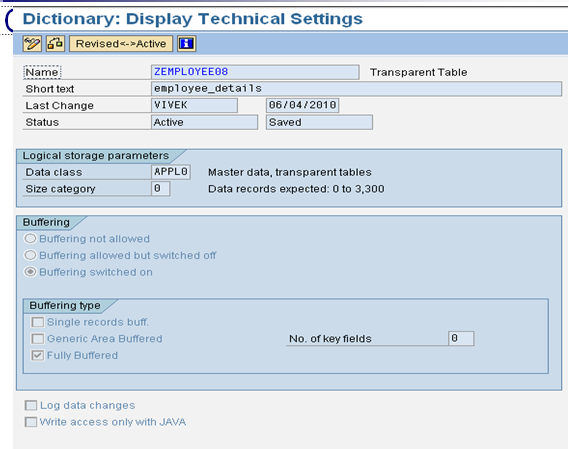
§To individually optimize the storage
requirements and accessing behavior of database tables.
Provides various features like – buffering,
logginghttps://www.youtube.com/channel/UCq55W5Hi-Cs8U4O590q6e0Q
Thursday, September 25, 2014
DATA DICTIONARY part1
DATA DICTIONARY:-
nDATA DICTIONARY
nDATABASE TABLES
nTECHNICAL SETTINGS
nOPERATIONS ON TABLES
nSTRUCTURES
nDOMAINS
nDATA ELEMENT
nSEARCH HELP
nVIEWS
nLOCK OBJECTS
nINTERNAL TABLE
nFIELD SYMBOLS
What is DATA DICTIONARY?
It is a system independent interface to the database.It is a virtual database(data about data).
it provides data for data manipulation and data for data processing. And it is also called
DDIC and ABAP dictionary.
https://www.youtube.com/channel/UCq55W5Hi-Cs8U4O590q6e0Q


Subscribe to:
Posts (Atom)